Meta
Most settings in meta information apply to All Roles. The Read Users and Write Users fields are exceptions — they allow you to restrict access to specific users.
元信息中的大多数设置对所有角色生效。可读用户和可写用户字段是例外——它们允许你将访问权限限制到特定用户。
Path
路径
The path for this meta to take effect.
此元信息生效的路径。
Password
密码
Password required to access this path.
- Meta information password will not take effect when accessed using
WebDav
Notes
If you want the password to be effective in subfolders, please check Apply to sub folder after the password. Do not check Write and then check Apply to sub folder
The correct check example is shown below. If you configure the options correctly, if you check the wrong option Write and then check Apply to sub folder, it will cause anyone to have permission to write dangerous operations
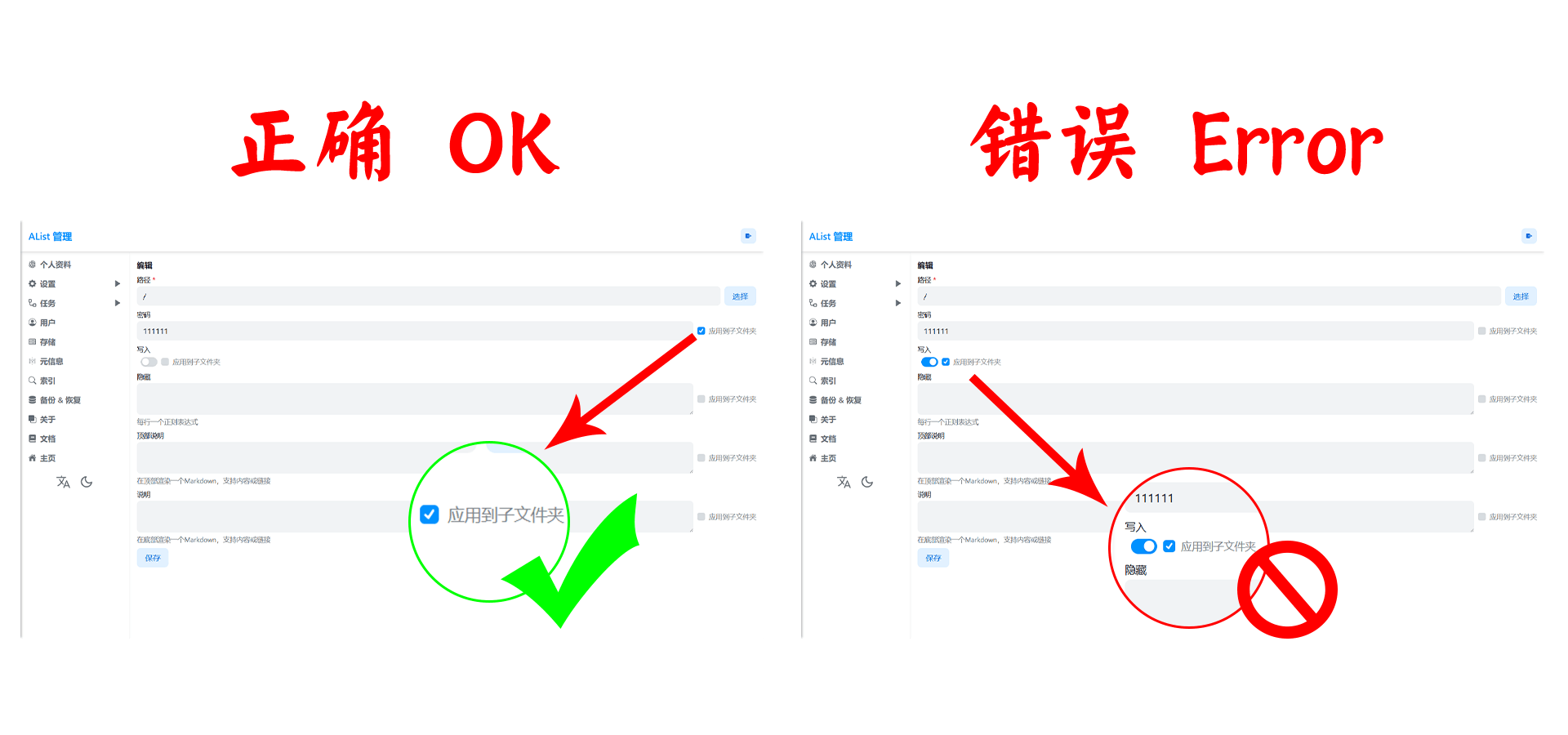
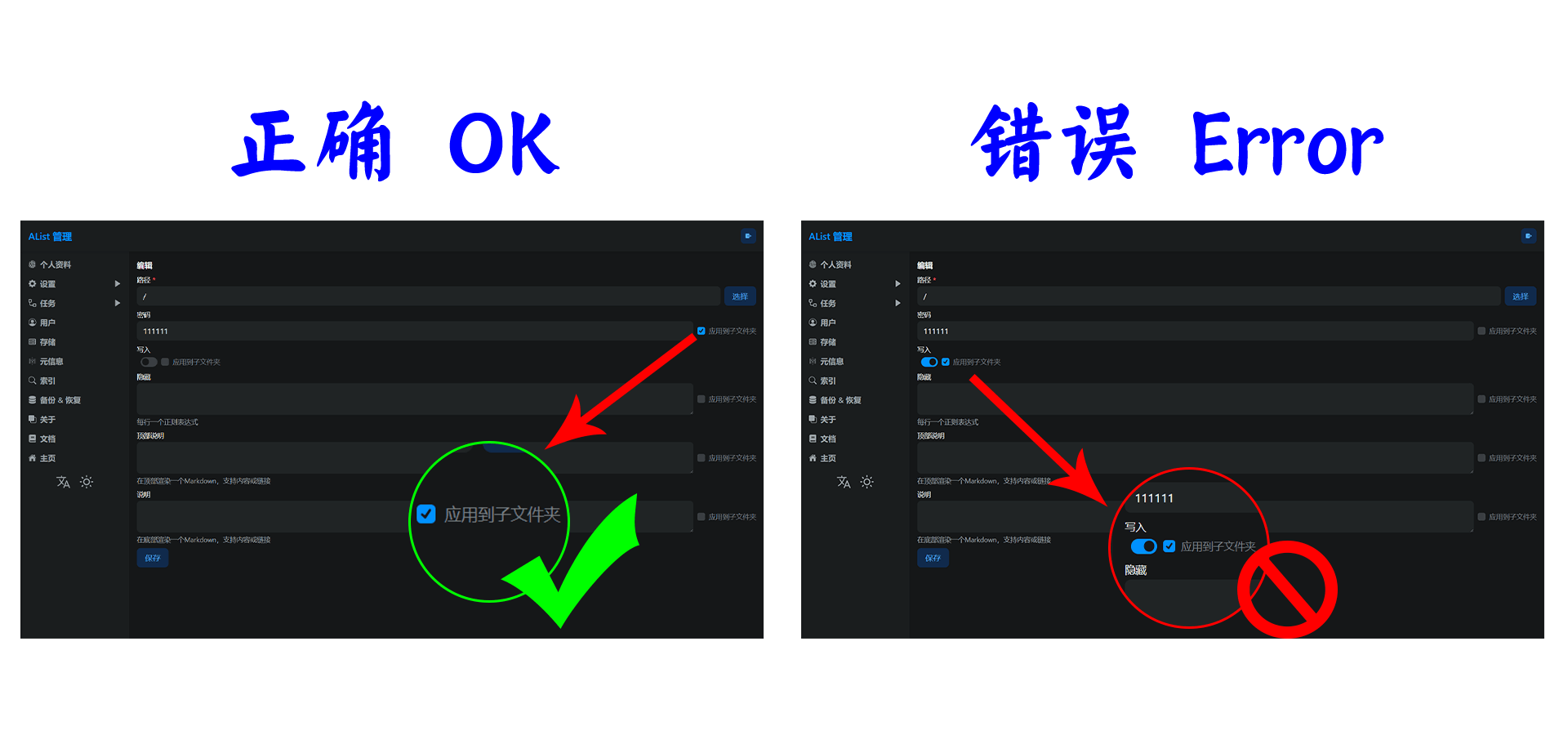
访问此路径需要密码
- 元信息密码在使用
WebDav访问时不会生效
注意事项
填写密码如果想在子文件夹也生效,请勾选密码后面的 应用到子文件夹,请勿勾选 写入再勾选应用到子文件夹
正确勾选示例图如下所示,正确配置选项,如果勾选错误为 写入再勾选应用到子文件夹 会造成任何人都拥有权限写入危险操作
Read Users
可读用户
A whitelist of users allowed to read this path. If the list is non-empty, only the selected users can access the path; all other users will be denied access.
- Users are selected by name in the management interface
- Check
Apply to sub folderto also restrict sub-directories
允许读取此路径的用户白名单。如果列表非空,则只有选中的用户才能访问该路径,其他所有用户将被拒绝访问。
- 在管理界面中通过用户名选择用户
- 勾选
应用到子文件夹可同时限制子目录
Write Users
可写用户
A whitelist of users allowed to write to this path. If the list is non-empty, only the selected users can perform write operations (upload, create, rename, move, delete) on this path.
- Users are selected by name in the management interface
- Check
Apply to sub folderto also restrict sub-directories
允许写入此路径的用户白名单。如果列表非空,则只有选中的用户才能对该路径执行写入操作(上传、新建、重命名、移动、删除)。
- 在管理界面中通过用户名选择用户
- 勾选
应用到子文件夹可同时限制子目录
Write Content Bypass
开放写入
Allow any user to make directory, create new file and upload files, bypassing user-level write permission checks.
允许任何用户新建目录、新文件和上传文件,绕过用户级别的写入权限检查。
Hide
隐藏
The objects to hide of this path, One regular expression (in Golang) per line
- Meta information hiding can take effect when accessed using
WebDav
此路径要隐藏的对象,每行一个正则表达式(在 Golang 中)
- 元信息隐藏在使用
WebDav访问时可以生效
Readme
说明
The Readme to render while enter this path, support markdown content or markdown link.
- Show at bottom of list
- The automatically rendered file name is:
readme.md
进入该路径时渲染的自述文件,支持 Markdown 内容或 Markdown 链接。
- 在列表底部显示
- 自动渲染的文件名为:
readme.md
Header
顶部说明
The Readme to render while enter this path, support markdown content or markdown link.
- Show at top of list
- The automatically rendered file name is:
top.md- Files can not be displayed in the list, for example
readme.mdis not displayed in the list - Backstage --> Settings --> Global --> Hidden files --> Add newline
/\/top.md/i
- Files can not be displayed in the list, for example
进入该路径时渲染的自述文件,支持 Markdown 内容或 Markdown 链接。
- 在列表顶部显示
- 自动渲染的文件名为:
top.md- 可以在列表中不显示文件,例如
readme.md不在列表显示 - 后台 --> 设置 --> 全局 --> 隐藏文件 --> 换行添加
/\/top.md/i
- 可以在列表中不显示文件,例如
Apply to sub folder
应用到子文件夹
Apply this meta to sub folder of specific path
将此元信息应用于特定路径的子文件夹
⚠️ Tips
⚠️ Tips
Regarding hidden, users without permissions can search for hidden folders/files, solutions:
✅ If you want to hide the folder in a folder, create a new Yuan information alone, and select the folder we want to hide,,Hidden if you want to hide everything, write directly.*
❌ You cannot directly fill in the meta information of the root directory /, and then fill in the folder we want to hide, the error case View details > 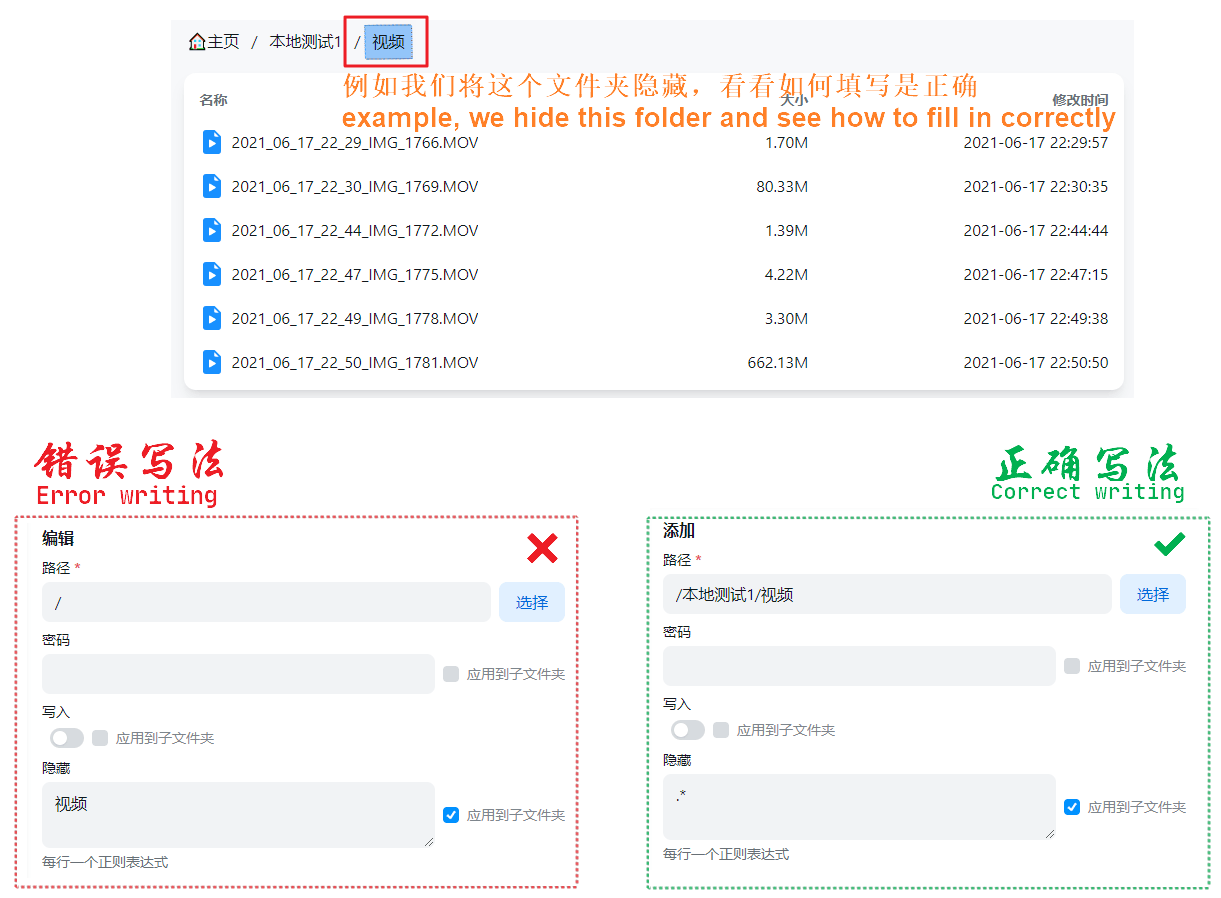
关于隐藏,没有权限的用户可以搜索到隐藏的文件夹/文件,解决方案:
✅如果你要隐藏某个文件夹內的文件夹,要单独新建一条元信息,路径选择我们要隐藏的文件夹,隐藏如果你要隐藏所有直接写 .*即可
❌ 不可以直接在选择根目录/的元信息內填写,然后隐藏位置填写我们要隐藏的文件夹,错误案例查看详情 >